总览
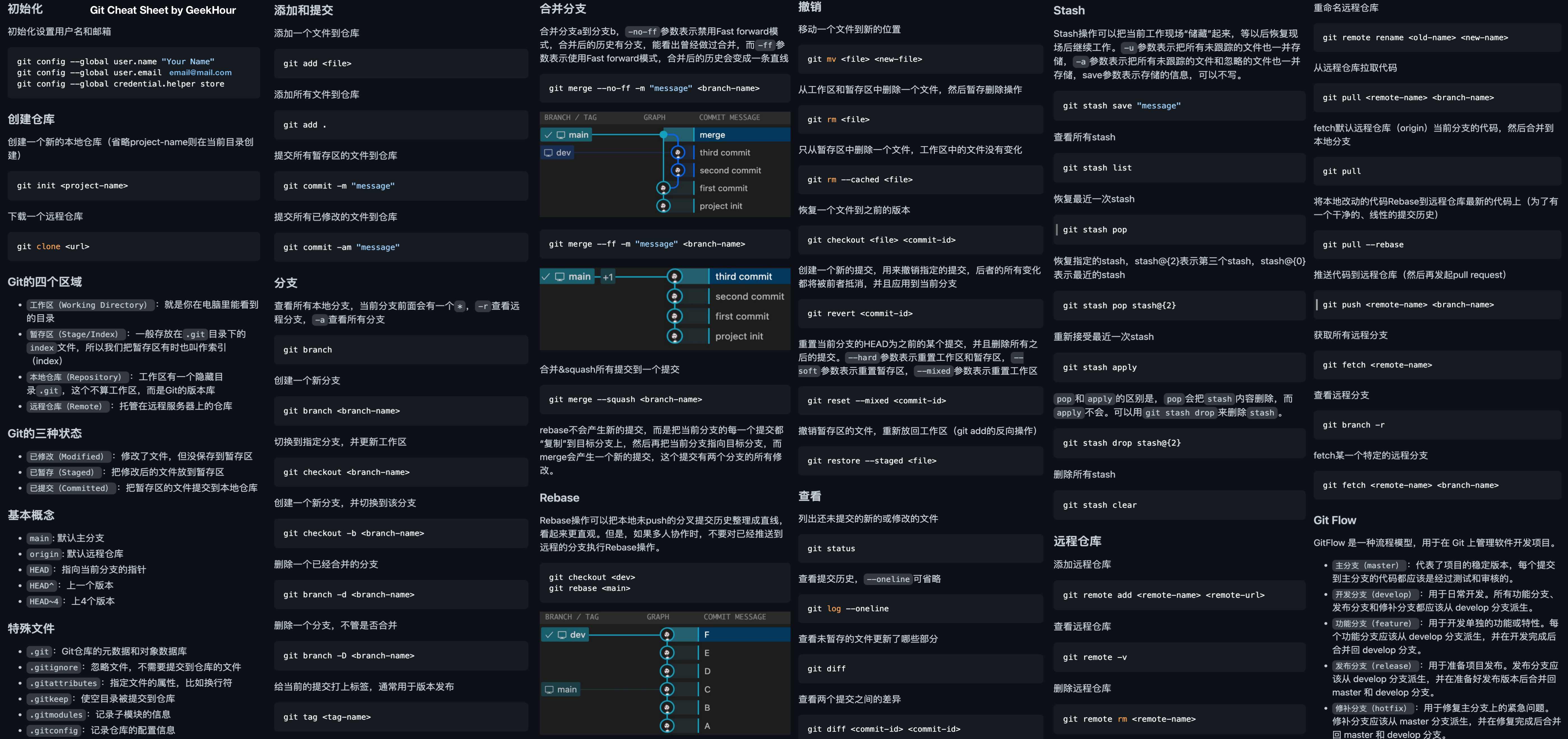
1.基本命令
1.1 初始化
如果是第一次下载,需要配置邮箱和用户名
git config --global user.name "xxx"
git config --global user.email "xxx@xx.com"
git config --global credential.helper store
git config –global http.proxy http://127.0.0.1:7890 # 配置代理
本地init一个仓库
git init # 如果有远程仓库可以使用git clone克隆并关联到远程仓库1.2 添加和提交
git add <fileName> # 添加到暂存区 git add . 则添加本地所有修改文件

git commit -m "xxx" # 提交暂存区内容到本地仓库 -am == git add . + git commit -m "xxx"远程仓库
1.3 远程仓库
若还未关联远程仓库则
git remote add <remote-name> <url>查看远程仓库
git remote -v删除远程仓库
git remote rm <remote-name>重命名远程仓库
git remote rename <old-name> <new-name>拉取代码
git pull <remote-name> <branch-name> # 直接git pull默认从origin的master/main分支拉取, git pull == git fetch + git merge推送代码
git push <remote-name> <branch-name> # 默认origin master/main注意事项:
如果第一次提交报如下错误:
gaoxinyu@DESKTOP-RC2SBQ4 MINGW64 ~/Desktop/gitDemo (master)
$ git push
fatal: The current branch master has no upstream branch.
To push the current branch and set the remote as upstream, use git push --set-upstream origin master
To have this happen automatically for branches without a tracking
upstream, see 'push.autoSetupRemote' in 'git help config'.原因: 当前分支本地有更改,但没有设置与远程仓库中某个分支的关联。每次使用
git push时,Git 需要知道要将本地的更改推送到远程仓库的哪个分支。解决方法: 使用
git push --set-upstream origin master当前分支会和远程的
origin/master关联,之后可以直接使用git push和git pull。
获取远程分支
git fetch # 仅拉取远程更新到本地,不进行合并,然后可以查看和比较远程分支的更改, 最后手动git merge
          # 好处: 可以避免自动合并, 查看远程分支的修改
列出本地分支和列出远程分支(分支相关操作在后面)
git branch
git branch -f
1.4 分支
查看分支
git branch重命名分支
git branch -m <old-branch-name> <new-branch-name>创建分支
git branch <branch-name> # 例如dev分支git branch dev切换分支
git checkout <branch-name> # 不推荐, git checkout是一个多功能命令,既可以用于切换分支,也可以用于其他操作,如恢复文件、查看历史记录等
git switch <branch-name> # 专门用于切换分支
删除分支
git branch -d <branch-name> # 删除已经合并的分支
git branch -D <branch-name>
打标签
git tag <tag-name>1.5 分支管理
合并分支
git merge <branch-name>
# 参数: -ff 使用Fast forward模式, --no-ff Fast forward模式, --abort 合并冲突之后取消合并,  --squash 所有提交合并为一个提交
rebase:
1.6 撤销
从工作区和暂存区删除一个文件
git rm <file>
git rm --cache <file> # 只从暂存区删除, 本地工作区保持不变
恢复一个文件到之前的版本
git checkout <file> <commit-id>1.7 查看
查看未add或commit的文件
git status查看未暂存的文件更新了哪些部分
git diff
git diff <commit-id> <commit-id> # 查看不同提交版本之间的差别
1.8 stash(暂时储藏本地修改)
储藏
git stash查看保存的修改
git stash list恢复修改(不删除stash中的记录) (推荐)
git stash apply恢复修改(删除stash中的记录)
git stash pop删除 stash 记录
git stash drop stash@{0}清空所有 stash
git stash clear1.9 Git Flow
master: 代表项目的稳定版本, 每个提交到主分支的代码都应该是经过测试和审核的
develop: 日常开发, 所有的feature分支、release分支、hotfix分支都应该从develop分支派生
feature: 用于开发单独的功能性或特性
release: 用于准备项目发布
hotfix: 用于修复主分支上的紧急问题
2. 小实战
master、feature、release分支的使用
2.1 从 master 分支拉取一个特性分支
# 切换到 master 分支
git switch master

# 拉取最新的 master 分支
git pull origin master

# 从 master 分支创建一个新的 feature 分支
git checkout -b feature/my-new-feature
2.2 在特性分支上进行开发
# 编辑文件
git add .
git commit -m "Add new feature"

# 如果有远程仓库,推送到远程分支, 若无自动创建
git push origin feature/my-new-feature
2.3 基于 master 拉取 release 分支进行发布准备
# 切换到 master 分支
git switch master

# 拉取最新的 master 分支
git pull origin master

# 从 master 拉取一个新的 release 版本分支
git checkout -b release/v1.0
2.4 将 feature 分支合并到 release 分支并打标签
# 确保 release 分支是最新的
git switch release/v1.0
git pull origin release/v1.0

# 合并 feature 分支到 release 分支
git merge feature/my-new-feature

# 解决冲突并提交
git commit -m "Merge feature/my-new-feature into release/v1.0"

# 打标签(假设版本是 v1.0)
git tag v1.0

# 推送到远程仓库
git push origin release/v1.0
git push origin v1.0
2.5 将 release 分支合并到 master 分支并发布
# 切换到 master 分支
git switch master

# 拉取最新的 master 分支
git pull origin master

# 将 release 分支合并到 master 分支
git merge release/v1.0

# 提交合并
git commit -m "Merge release/v1.0 into master and release v1.0"

# 推送到远程仓库
git push origin master
2.6 清理特性和发布分支
# 删除本地的 feature 和 release 分支
git branch -d feature/my-new-feature
git branch -d release/v1.0

# 删除远程的分支
git push origin --delete feature/my-new-feature
git push origin --delete release/v1.0