1. mybatis安装入门使用
1.1 安装
<!--mybatis-plus-->
<dependency>
    <groupId>com.baomidou</groupId>
    <artifactId>mybatis-plus-boot-starter</artifactId>
    <version>3.5.4</version>
</dependency>
<!--mybatis-->
<dependency>
    <groupId>org.mybatis.spring.boot</groupId>
    <artifactId>mybatis-spring-boot-starter</artifactId>
    <version>2.3.2</version>
</dependency>
<!--mysql-->
<dependency>
    <groupId>mysql</groupId>
    <artifactId>mysql-connector-java</artifactId>
    <version>8.0.27</version>
</dependency>
问题: mybatis和mybatis-plus存在版本不兼容问题,以上版本可以正常使用, 问题报错如下:
Correct the classpath of your application so that it contains compatible versions of the classes com.baomidou.mybatisplus.core.MybatisMapperAnnotationBuilder and org.apache.ibatis.session.Configuration1.2 配置
spring:
  datasource:
    url: jdbc:mysql://127.0.0.1:3306/mp?useSSL=false&serverTimezone=GMT%2B8&characterEncoding=utf8
    driver-class-name: com.mysql.cj.jdbc.Driver
    username: root
    password: 123456

mybatis:
  mapper-locations: classpath*:mapper/**/*.xml  # MyBatis 的 Mapper XML 文件的位置
  type-aliases-package: com.example.model  # 指定实体类的包路径
  configuration:
    log-impl: org.apache.ibatis.logging.stdout.StdOutImpl # 开启控制台打印日志
    map-underscore-to-camel-case: true  # 自动将数据库字段名下划线转换为驼峰命名
    cache-enabled: false  # 是否启用二级缓存,默认启用
  type-handlers-package: com.example.handler  # 指定 TypeHandler 的包路径, 可以使用TypeHandler对某个字段加解密
1.3 写sql
<?xml version="1.0" encoding="UTF-8"?>
<!DOCTYPE mapper PUBLIC "-//mybatis.org//DTD Mapper 3.0//EN" "http://mybatis.org/dtd/mybatis-3-mapper.dtd">
<mapper namespace="cn.gaosanjin.cuit.mapper.UserMapper">
    <update id="updateUser" parameterType="cn.gaosanjin.cuit.domain.entity.User">
        update user
        <set>
            <if test="name != null">
                name = #{name}
            </if>
        </set>
        where id = #{id}
    </update>

    <insert id="InsertUser">
        insert into user(name, age, email, photo)
        values (#{name}, #{age}, #{email}, #{photo})
    </insert>

    <insert id="insertUserList">
        insert into user(name, age, email, photo) values
        <foreach collection="list" item="user" separator=",">
            (#{user.name}, #{user.age}, #{user.email}, #{user.photo})
        </foreach>
    </insert>

    <select id="getUserById" resultType="cn.gaosanjin.cuit.domain.entity.User">
        select id, name, email, photo, age, create_time, modify_time from user
        <where>
            <if test="id != null">id = #{id}</if>
        </where>
    </select>
</mapper>
2. mybatis进阶-详解Mybatis的Mapper映射文件
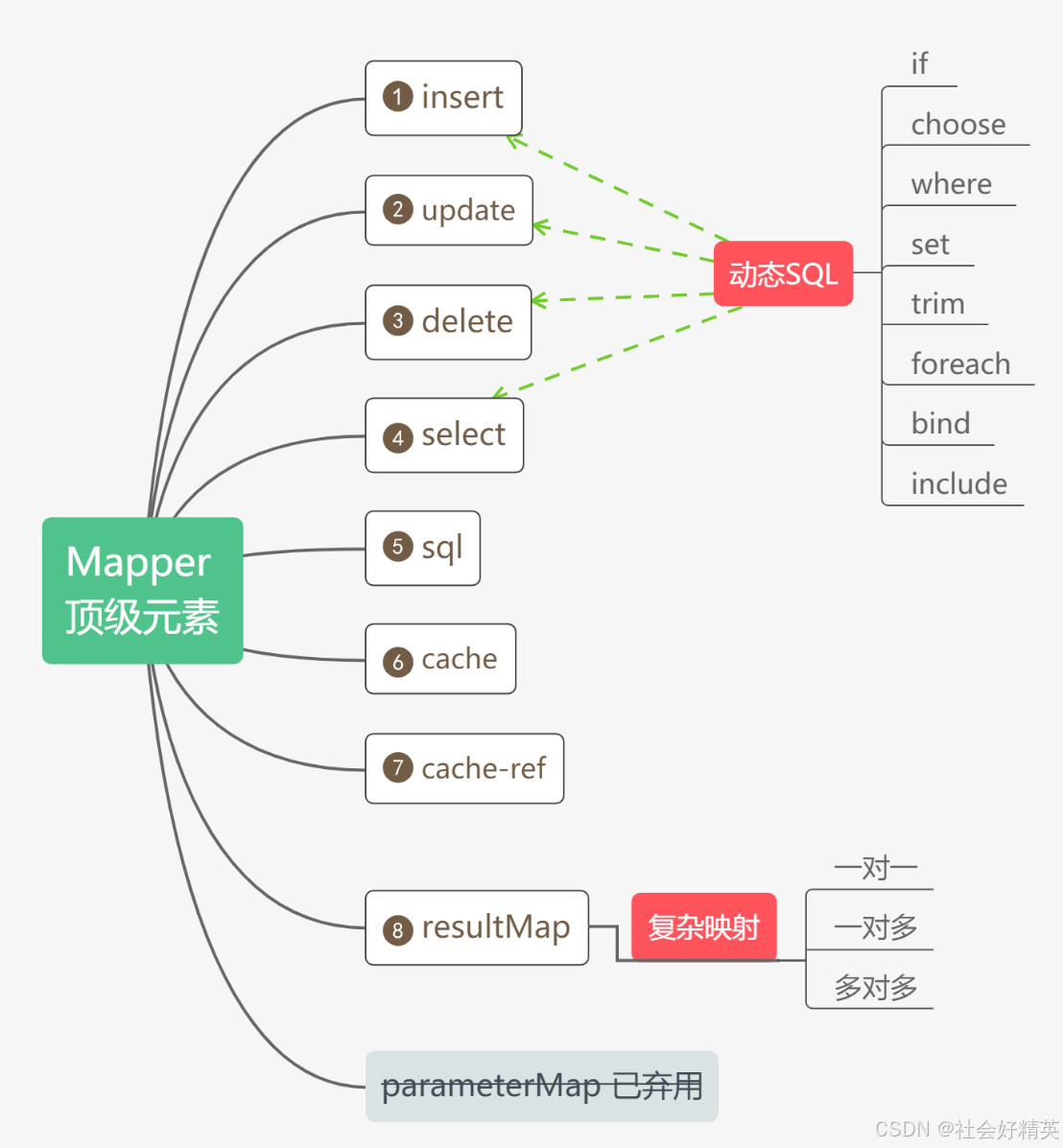
2.1 select
所有的参数
<select
  id="selectUser"
  parameterType="int"
  parameterMap="deprecated"
  resultType="hashmap"
  resultMap="personResultMap"
  flushCache="false"
  useCache="true"
  timeout="10"
  fetchSize="256"
  statementType="PREPARED"
  resultSetType="FORWARD_ONLY"
  databaseId="mysql"
  resultOrdered="false"
  resultSets="rs1,rs2,rs3">
  select * from t_user
</select>
#{} 作为占位符,${} 作为替换符
使用 #{} 时,MyBatis 会把 SQL 语句中的 #{} 替换为 ? 占位符,并将用户传递的参数值与 SQL 分离进行绑定。这样,数据库处理 SQL 语句时会将参数作为数据来处理,而不会将其当作 SQL 语句的一部分。通过将 SQL 语句和参数分开处理,防止输入的参数被当作 SQL 语句执行,从而避免 SQL 注入攻击。
由于 SQL 的结构部分(如表名和列名)在预编译时无法被参数化(它们不是值,而是 SQL 语句的一部分),因此不能使用 #{} 占位符, 对于表名、列名和 ORDER BY 字段等需要动态变化的部分,MyBatis 使用 ${} 占位符。{} 占位符会将传递的参数值直接插入到 SQL 语句中,而不会做预编译,因此它适用于表名、列名等需要动态变化的 SQL 部分。
总结: #{} 通过sql结构和参数分离保证sql安全 , 但是在sql编译的时候使用占位符会导致sql结构错误因此只能使用${}
<select id="getUsers" resultType="User">
    SELECT * FROM users ORDER BY
    <choose>
        <when test="columnName == 'age'">age</when>
        <when test="columnName == 'name'">name</when>
        <otherwise>id</otherwise>
    </choose>
</select>
2.2 insert/update/delete
所有的参数
<insert
  id="insertUser"
  parameterType="domain.vo.User"
  flushCache="true"
  statementType="PREPARED"
  keyProperty="id"
  keyColumn=""
  useGeneratedKeys="true"
  timeout="20">

<update
  id="updateUser"
  parameterType="domain.vo.User"
  flushCache="true"
  statementType="PREPARED"
  timeout="20">

<delete
  id="deleteUser"
  parameterType="domain.vo.User"
  flushCache="true"
  statementType="PREPARED"
  timeout="20">
参数介绍
useGeneratedKeys : (仅适用于 insert 和 update)这会令 MyBatis 使用 JDBC 的 getGeneratedKeys 方法来取出由数据库内部生成的主键(比如:像 MySQL 和 SQL Server 这样的关系型数据库管理系统的自动递增字段),默认值:false
keyProperty: 指定 MyBatis 在执行 INSERT 操作后,应该将数据库生成的主键值赋值给 Java 对象的哪个属性。通常,这个属性是实体类中的主键属性。
2.3 sql标签
<sql id="baseColumns">
    id, name, email
</sql>

<select id="findUserById" resultType="User">
    SELECT
    <include refid="baseColumns"/>
    FROM users
    WHERE id = #{id}
</select>
2.4 resultmap
pro: java中的字段; column: 数据库查询字段
<resultMap id="basemap" type="cn.gaosanjin.cuit.domain.entity.User">
    <result property="id" column="id"/>
    <result property="name" column="name"/>
    <result property="age" column="age"/>
    <result property="photo" column="photo"/>
    <result property="email" column="email"      typeHandler="cn.gaosanjin.cuit.common.handler.AesEncryptTypeHandler"/>
    <result property="createTime" column="create_time"/>
    <result property="modifyTime" column="modify_time"/>
</resultMap>